
 Os referí en el artículo S-025 que había probado la solución de ApexGrid, que podría ser la solución de DataGrid para cualquier proyecto, pero que había desistido de utilizarla porque no vi cómo se podía adaptar al español.
Al cabo de pocos días, consulté otra vez la web de ApexGrid e identifiqué que se había publicado la versión 3.3.0 y que se había solucionado este problema y además, se había renovado la web de documentación, estando mucho mejor.
Completé la demo que estaba haciendo y mi impresión es que todavía hay muchos aspectos que no entiendo de la solución, por ejemplo, que las acciones a nivel de registro, el típico CRUD, no esté disponible en la versión Community y su en la Profesional, por ello, en mis proyectos voy a seguir utilizando el DataGrid que he explicado en el artículo S-025 . Este artículo lo publico porque es posible que pueda ayudar a quién se inicia en el uso de ApexGrid en Svelte, ya que la documentación, no explica nada de este entorno.
Objetivo
Seleccionar un DataGrid «potente» para integrarlo en las app’s de los desarrollos en Svelte.
DEMO: https://fhumanes.com/apexgrid-svelte/
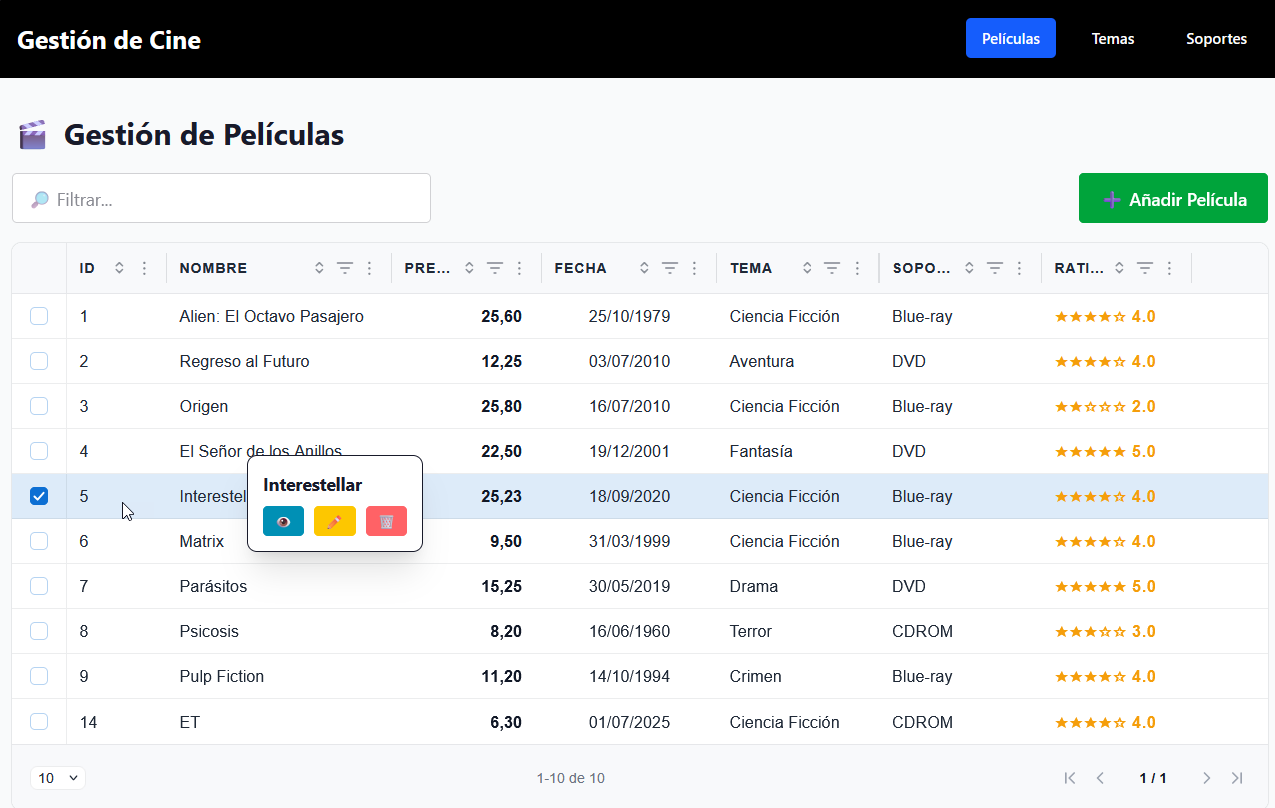
Para que salga el «popup» de las acciones hay que seleccionar el checkbox (casilla de verificación) o pulsar la tecla de «espacio».
Solución Técnica
En el ejemplo se ha programado la funcionalidad que he utilizado en muchos casos con la Gestión de Películas y el desarrollo de Back-End está disponible y explicado en el artículo S-002.
En el ejemplo, como indico en el título, se utiliza TailWind CSS y Daisy UI, Para la ventana popup para las acciones Add, View y Edit, se ha utilizado «Drawer», que a mí me gusta mucho.
De los 3 DataGrid que hay en el ejemplo (Películas, Temas y Soportes), hay 3 variedades y en el de Tema se ha incluido la edición «inline» haciendo doble click en el registro.
Como he dicho, hay aspectos de la solución que no he entendido, pues no entiendo que ne la versión Community no disponga:
- Evento de selección y acción, que sí existe en la versión de pago.
- No tenga ningún atributo para alineación del dato y cabecera. Con métodos alternativos, se puede hacer.
- en «CellTemplate» o «HeadTemplate», no podemos utilizar las clases de TailWind. El motivo es porque funciona como un Web Component y no trabaja directamente con la DOM.
En los ejemplos puedo comprobar que funcionalmente es muy potente, pero su forma de configuración no es «cómoda» para mi.
Paso a mostrar algunos de los ficheros del ejemplo que tienen más interes.
import { mount } from 'svelte'
import './app.css'
import './global.css'

import App from './App.svelte'

// Importa y configura Apex Grid
import { setup } from "apex-grid";
import "apex-grid/define";
setup(); // registra <apex-grid> y aplica el CSS por defecto

// document.documentElement.setAttribute("data-theme", "esmerald");  // Establece el tema al cargar la aplicación

const app = mount(App, {
  target: document.getElementById('app'),
})

export default app
<script>
  import { onMount } from "svelte";
  import * as XLSX from "xlsx";
  import Swal from "sweetalert2";
  import api from "./lib/api.js";
  import MovieDrawer from "./MovieDrawer.svelte";

  import "apex-grid";
  import { html } from "lit";
  import "./MovieList.css";

  import { esLocale } from "apex-grid";

  let movies = $state([]);
  let themes = $state([]);
  let supports = $state([]);

  let loading = $state(true);
  let errorMessage = $state(null);

  let filter = $state("");
  let filteredData = $state([]);

  let gridRef = $state(null);

  let selectedMovie = $state({});
  let showDrawer = $state(false);
  let drawerMode = $state("view");

  let popupVisible = $state(false);
  let popupX = $state(0);
  let popupY = $state(0);
  let popupMovie = $state(null);

  function closePopup() {
    popupVisible = false;
    popupMovie = null;

    if (gridRef) gridRef.clearSelection();
  }

  function normalize(str) {
    return String(str)
      .normalize("NFD")
      .replace(/[\u0300-\u036f]/g, "")
      .toLowerCase();
  }

  function filterData() {
    const f = normalize(filter);

    return movies.filter((row) => {
      return (
        normalize(row.name).includes(f) ||
        normalize(row.id).includes(f) ||
        normalize(row.price).includes(f) ||
        normalize(row.rating).includes(f) ||
        normalize(row.theme).includes(f) ||
        normalize(row.support).includes(f) ||
        normalize(row.date).includes(f) ||
        normalize(row.dateText).includes(f)
      );
    });
  }

  async function fetchAllData() {
    errorMessage = null;

    try {
      const [moviesRes, themesRes, supportsRes] = await Promise.all([
        api.get("/movies"),
        api.get("/themes"),
        api.get("/supports")
      ]);

      movies = moviesRes.data.map((m) => ({
        id: m.id_movie,
        name: m.name,
        price: parseFloat(m.price),
        date: new Date(m.startDate).toISOString(),
        dateText: new Date(m.startDate).toLocaleDateString("es-ES", {
          day: "2-digit",
          month: "2-digit",
          year: "numeric"
        }),
        rating: parseInt(m.rating, 10),
        theme: m.theme,
        theme_id: String(m.theme_id),
        support: m.support,
        support_id: String(m.support_id)
      }));

      themes = themesRes.data;
      supports = supportsRes.data;

      filteredData = filterData();
    } catch (err) {
      errorMessage = "No se pudieron cargar los datos.";
    } finally {
      loading = false;
    }
  }

  onMount(() => {
    fetchAllData();
  });

  // Configuración del grid, tiene que ser un efecto separado porque gridRef puede no estar inicializado en el primer render.
  $effect(() => {
    if (!gridRef) return;

    gridRef.localeText = esLocale; // Establece el idioma a español
    gridRef.lang = "es";
    gridRef.columns = columns;  // Establece las columnas definidas más abajo

    gridRef.pagination = {  // Configuración de la paginación
      enabled: true,
      pageSize: 5,
      pageSizeOptions: [5, 10, 15, 25, 50]
    };

    gridRef.selection = { // Configuración de la selección de filas
      enabled: true,
      mode: "single",
      showCheckboxColumn: true
    };

    gridRef.addEventListener("rowSelected", () => {
      const rows = gridRef.selectedRows ?? [];
      // Si NO hay filas seleccionadas → cerrar popup
      if (rows.length === 0) {
        popupVisible = false;
        popupMovie = null;
        return;
      }

      // Si hay selección → abrir popup
      const last = rows.at(-1);
      if (!last) return;

      popupMovie = last;
      popupX = 200;
      popupY = window.innerHeight / 2;
      popupVisible = true;
    });
  });

  // Actualiza los datos del grid cuando filteredData cambie. Tiene que ser un efecto separado porque gridRef puede no estar inicializado en el primer render.
  $effect(() => {
    if (gridRef) {
      gridRef.data = filteredData;
    }
  });

  document.addEventListener("click", (e) => {
    if (!popupVisible) return;
    if (!e.target.closest(".popup-menu")) closePopup();
  });

  function handleView(movie) {
    drawerMode = "view";
    selectedMovie = { ...movie };
    showDrawer = true;
  }

  function handleAdd() {
    drawerMode = "add";
    selectedMovie = {
      id: null,
      name: "",
      price: "",
      date: "",
      rating: "1",
      theme_id: themes.length ? String(themes[0].id_theme) : "",
      support_id: supports.length ? String(supports[0].id_support) : ""
    };
    showDrawer = true;
  }

  function handleEdit(movie) {
    drawerMode = "edit";
    selectedMovie = {
      ...movie,
      price: String(movie.price),
      date: movie.date.split("T")[0],
      rating: String(movie.rating),
      theme_id: String(movie.theme_id),
      support_id: String(movie.support_id)
    };
    showDrawer = true;
  }

  async function handleDelete(id, name) {
    const result = await Swal.fire({
      title: "¿Estás seguro?",
      text: `Eliminar "${name}" es irreversible.`,
      icon: "warning",
      showCancelButton: true
    });

    if (!result.isConfirmed) return;

    try {
      await api.delete(`/movies/${id}`);
      Swal.fire("Eliminada", `"${name}" eliminada.`, "success");
      fetchAllData();
    } catch (err) {
      Swal.fire("Error", "No se pudo eliminar.", "error");
    }
  }

  function closeDrawer() {
    showDrawer = false;
    selectedMovie = {};
  }

  async function saveMovie(values) {
    const normalizedName = values.name.trim().toLowerCase();
    const currentId = selectedMovie?.id != null ? Number(selectedMovie.id) : null;

    const duplicate = movies.find((m) => {
      const sameName = m.name.trim().toLowerCase() === normalizedName;
      const differentId = currentId == null ? true : m.id !== currentId;
      return sameName && differentId;
    });

    if (duplicate) {
      Swal.fire(
        "Duplicado",
        `Ya existe una película con ese nombre (ID ${duplicate.id})`,
        "warning"
      );
      return;
    }

    const movieData = {
      name: values.name,
      price: parseFloat(values.price.replace(",", ".")),
      startDate: values.date,
      rating: values.rating,
      theme_id: parseInt(values.theme_id),
      support_id: parseInt(values.support_id)
    };

    try {
      if (drawerMode === "add") {
        await api.post("/movies", movieData);
        Swal.fire("Guardada", "Película añadida correctamente", "success");
      } else {
        await api.put(`/movies/${selectedMovie.id}`, movieData);
        Swal.fire("Actualizada", "Película actualizada correctamente", "success");
      }

      closeDrawer();
      fetchAllData();
    } catch (err) {
      Swal.fire("Sin cambios", "No se ha variado ningún dato", "info");
    }
  }

  const columns = [
    { key: "id", headerText: "ID", width: "80px", sort: true },
    { key: "name", headerText: "Nombre", width: "180px", sort: true, filter: true },

    {
      key: "price",
      headerText: "Precio",
      width: "120px",
      type: "number",
      sort: true,
      filter: true,
      cellTemplate: ({ value }) => {
        const fmt = new Intl.NumberFormat("es-ES", {
          minimumFractionDigits: 2,
          maximumFractionDigits: 2
        }).format;

        return html`
          <div style="width:100%; text-align:right; padding-right:6px; font-variant-numeric: tabular-nums;">
            ${fmt(value)}
          </div>
        `;
      }
    },

    {
      key: "date",
      headerText: "Fecha",
      width: "140px",
      type: "date",
      sort: true,
      filter: true,
      cellTemplate: ({ value }) => {
        const d = value instanceof Date ? value : new Date(value);
        if (isNaN(d.getTime())) return html``;

        const formatted = d.toLocaleDateString("es-ES", {
          day: "2-digit",
          month: "2-digit",
          year: "numeric"
        });

        return html`
          <div style="width:100%;display:flex;justify-content:center;">
            <span style="font-variant-numeric: tabular-nums;">${formatted}</span>
          </div>
        `;
      }
    },

    { key: "theme", headerText: "Tema", width: "130px", sort: true, filter: true },
    { key: "support", headerText: "Soporte", width: "130px", sort: true, filter: true },

    {
      key: "rating",
      headerText: "Rating",
      width: "120px",
      type: "number",
      filter: true,
      sort: true,
      cellTemplate: ({ value }) => {
        const full = Math.floor(value);
        const half = value - full >= 0.5 ? "½" : "";
        const stars = "★".repeat(full) + half + "☆".repeat(5 - full - (half ? 1 : 0));

        return html`
          <span style="color:#f59e0b;font-weight:600;letter-spacing:0.5px">
            ${stars} ${value.toFixed(1)}
          </span>
        `;
      }
    }
  ];
</script>

<div class="drawer drawer-end">
  <input
    id="movie-drawer"
    type="checkbox"
    class="drawer-toggle"
    bind:checked={showDrawer}
  />

  <div class="drawer-content">
    <div class="max-w-5xl mt-6 px-2">
      <h2 class="text-2xl font-bold mb-4 flex items-center gap-2">
        <span class="text-primary">🎬</span> Gestión de Películas
      </h2>

      <div class="flex flex-col md:flex-row md:items-center md:justify-between gap-3 mb-4">
        <div class="w-full md:w-1/3 relative">
          <input
            class="input input-bordered w-full pr-8"
            placeholder="🔎 Filtrar..."
            value={filter}
            oninput={(e) => {
              filter = e.target.value;
              filteredData = filterData();
            }}
          />

          {#if filter}
            <button
              class="absolute right-2 top-1/2 -translate-y-1/2 text-gray-500 hover:text-gray-700"
              onclick={() => {
                filter = "";
                filteredData = filterData();
              }}
            >
              ✖
            </button>
          {/if}
        </div>

        <div class="gap-2 flex align-items-end">
          <button class="btn btn-success" onclick={handleAdd}>
            ➕ Añadir Película
          </button>
        </div>
      </div>

      {#if loading}
        <p class="text-center py-8">Cargando...</p>
      {:else if errorMessage}
        <div class="alert alert-error justify-center">{errorMessage}</div>
      {:else}
        <apex-grid
          bind:this={gridRef}
          style="height: auto;"
          >
        </apex-grid>

        {#if popupVisible}
          <div
            class="popup-menu fixed z-50 bg-white border shadow-xl rounded-lg p-3
                  animate-[fadeIn_0.18s_ease-out] flex flex-col gap-2"
            style="top:{popupY}px; left:{popupX}px;"
          >
            <p class="font-bold text-sm">{popupMovie.name}</p>

            <div class="flex gap-2">
              <button
                class="btn btn-xs btn-info"
                onclick={() => { handleView(popupMovie); closePopup(); }}
                title="Ver"
              >
                👁
              </button>

              <button
                class="btn btn-xs btn-warning"
                onclick={() => { handleEdit(popupMovie); closePopup(); }}
                title="Editar"
              >
                ✏️
              </button>

              <button
                class="btn btn-xs btn-error"
                onclick={() => { handleDelete(popupMovie.id, popupMovie.name); closePopup(); }}
                title="Eliminar"
              >
                🗑
              </button>
            </div>
          </div>
        {/if}
      {/if}
    </div>
  </div>

  <div class="drawer-side">
    <label for="movie-drawer" class="drawer-overlay"></label>

    <MovieDrawer
      mode={drawerMode}
      movie={selectedMovie}
      {themes}
      {supports}
      onSave={saveMovie}
      onClose={closeDrawer}
    />
  </div>
</div>

<style>
@keyframes fadeIn {
  from { opacity: 0; transform: scale(0.96); }
  to   { opacity: 1; transform: scale(1); }
}
</style>
<script>
  const {
    mode = "view",
    movie = {},
    themes = [],
    supports = [],
    onSave,
    onClose
  } = $props();

  let formValues = $state({
    name: "",
    price: "",
    date: "",
    rating: "1",
    theme_id: "",
    support_id: ""
  });

  let errors = $state({});

  $effect(() => {
    if (mode !== "view" && movie) {
      formValues.name = movie.name ?? "";
      formValues.price = movie.price != null ? String(movie.price).replace(".", ",") : "";
      formValues.date = movie.date ?? "";
      formValues.rating = movie.rating != null ? String(movie.rating) : "1";
      formValues.theme_id = movie.theme_id != null ? String(movie.theme_id) : (themes[0] ? String(themes[0].id_theme) : "");
      formValues.support_id = movie.support_id != null ? String(movie.support_id) : (supports[0] ? String(supports[0].id_support) : "");
      errors = {};
    }
  });

  function validateMovie(values) {
    const e = {};

    if (!values.name.trim()) e.name = "El nombre es obligatorio";

    if (!values.price.trim()) {
      e.price = "El precio es obligatorio";
    } else if (!/^\d+([.,]\d{1,2})?$/.test(values.price)) {
      e.price = "Formato de precio inválido";
    }

    if (!values.date) {
      e.date = "La fecha es obligatoria";
    } else if (isNaN(Date.parse(values.date))) {
      e.date = "Fecha inválida";
    }

    if (!["1", "2", "3", "4", "5"].includes(values.rating)) {
      e.rating = "Valoración inválida";
    }

    if (!values.theme_id) e.theme_id = "Tema obligatorio";
    if (!values.support_id) e.support_id = "Soporte obligatorio";

    return e;
  }

  function handleSubmit(e) {
    e.preventDefault();
    errors = validateMovie(formValues);
    if (Object.keys(errors).length) return;
    if (onSave) onSave(formValues);
  }

  function formatPrice(price) {
    return new Intl.NumberFormat("es-ES", {
      style: "currency",
      currency: "EUR",
      minimumFractionDigits: 2,
      maximumFractionDigits: 2
    }).format(price);
  }
</script>

<!-- ========================================================= -->
<!--   SOLO CONTENIDO DEL PANEL LATERAL (SIN drawer, SIN input) -->
<!-- ========================================================= -->

<div class="menu bg-base-200 text-base-content w-full max-w-xl p-6">

  <h3 class="font-bold text-lg mb-4">
    {mode === "add"
      ? "Añadir Película"
      : mode === "edit"
      ? "Editar Película"
      : "Detalles de la Película"}
  </h3>

  {#if mode === "view"}

    <div class="grid grid-cols-1 md:grid-cols-2 gap-4">
      <div class="form-control">
        <span class="font-semibold">Nombre</span>
        <input class="input input-bordered w-full" value={movie.name} readonly disabled />
      </div>

      <div class="form-control">
        <span class="font-semibold">Precio</span>
        <input class="input input-bordered w-full" value={formatPrice(movie.price)} readonly disabled />
      </div>

      <div class="form-control">
        <span class="font-semibold">Fecha</span>
        <input class="input input-bordered w-full" value={movie.dateText} readonly disabled />
      </div>

      <div class="form-control">
        <span class="font-semibold">Valoración</span>
        <div class="input input-bordered bg-star w-full">
          <div class="flex gap-1 text-yellow-400 mt-1 text-2xl">
            {#each Array(5) as _, i}
              <span>{i < movie.rating ? "★" : "☆"}</span>
            {/each}
          </div>
        </div>
      </div>

      <div class="form-control">
        <span class="font-semibold">Tema</span>
        <input
          class="input input-bordered w-full"
          value={themes.find(t => t.id_theme == movie.theme_id)?.theme}
          readonly
          disabled
        />
      </div>

      <div class="form-control">
        <span class="font-semibold">Soporte</span>
        <input
          class="input input-bordered w-full"
          value={supports.find(s => s.id_support == movie.support_id)?.support}
          readonly
          disabled
          />

      </div>
    </div>

    <div class="flex justify-end gap-2 mt-4">
      <button class="btn" type="button" onclick={onClose}>Cerrar</button>
    </div>

  {:else}

    <form class="grid grid-cols-1 md:grid-cols-2 gap-4" onsubmit={handleSubmit}>

      <div class="form-control">
        <label class="label" for="name">Nombre</label>
        <input id="name" class="input input-bordered" bind:value={formValues.name} />
        {#if errors.name}<p class="text-red-500 text-sm">{errors.name}</p>{/if}
      </div>

      <div class="form-control">
        <label class="label" for="price">Precio</label>
        <input id="price" class="input input-bordered" bind:value={formValues.price} />
        {#if errors.price}<p class="text-red-500 text-sm">{errors.price}</p>{/if}
      </div>

      <div class="form-control">
        <label class="label" for="date">Fecha</label>
        <input id="date" type="date" class="input input-bordered" bind:value={formValues.date} />
        {#if errors.date}<p class="text-red-500 text-sm">{errors.date}</p>{/if}
      </div>

      <div class="form-control">
        <label class="label" for="rating">Valoración</label>
        <select id="rating" class="select select-bordered" bind:value={formValues.rating}>
          {#each [1, 2, 3, 4, 5] as r}
            <option value={String(r)}>{r}</option>
          {/each}
        </select>
        {#if errors.rating}<p class="text-red-500 text-sm">{errors.rating}</p>{/if}
      </div>

      <div class="form-control">
        <label class="label" for="theme_id">Tema</label>
        <select id="theme_id" class="select select-bordered" bind:value={formValues.theme_id}>
          <option value="">-- Selecciona tema --</option>
          {#each themes as t}
            <option value={String(t.id_theme)}>{t.theme}</option>
          {/each}
        </select>
        {#if errors.theme_id}<p class="text-red-500 text-sm">{errors.theme_id}</p>{/if}
      </div>

      <div class="form-control">
        <label class="label" for="support_id">Soporte</label>
        <select id="support_id" class="select select-bordered" bind:value={formValues.support_id}>
          <option value="">-- Selecciona soporte --</option>
          {#each supports as s}
            <option value={String(s.id_support)}>{s.support}</option>
          {/each}
        </select>
        {#if errors.support_id}<p class="text-red-500 text-sm">{errors.support_id}</p>{/if}
      </div>

      <div class="col-span-1 md:col-span-2 flex justify-end gap-2 mt-4">
        <button class="btn btn-primary" type="submit">
          {mode === "add" ? "Guardar" : "Actualizar"}
        </button>
        <button class="btn" type="button" onclick={onClose}>Cancelar</button>
      </div>

    </form>

  {/if}
</div>

<style>
 input[readonly] {
    background-color: #f9fafb;
    border-color: #e5e7eb;
    cursor: not-allowed;
  }

  .bg-star {
    background-color: #f9fafb;
    border: #e7e9eb;
  }
</style>
<script>
  import { onMount } from "svelte";
  import Swal from "sweetalert2";
  import api from "./lib/api.js";
  import ThemeDrawer from "./ThemeDrawer.svelte";

  import "apex-grid";
  import { html } from "lit";
  import { esLocale } from "apex-grid";

  let themes = $state([]);
  let loading = $state(true);
  let errorMessage = $state(null);

  let filter = $state("");
  let filteredData = $state([]);

  let gridRef = $state(null);

  let selectedTheme = $state({});
  let drawerOpen = $state(false);
  let drawerMode = $state("view");

  let popupVisible = $state(false);
  let popupX = $state(0);
  let popupY = $state(0);
  let popupTheme = $state(null);

  function closePopup() {
    popupVisible = false;
    popupTheme = null;

    if (gridRef) gridRef.clearSelection();
  }

  function normalize(str) {
    return String(str)
      .normalize("NFD")
      .replace(/[\u0300-\u036f]/g, "")
      .toLowerCase();
  }

  function filterData() {
    const f = normalize(filter);

    return themes.filter((row) => {
      return (
        normalize(row.id_theme).includes(f) ||
        normalize(row.theme).includes(f)
      );
    });
  }

  async function fetchThemes() {
    errorMessage = null;
    loading = true;

    try {
      const res = await api.get("/themes");
      themes = res.data;
      filteredData = filterData();
    } catch (err) {
      errorMessage = "No se pudieron cargar los temas.";
    } finally {
      loading = false;
    }
  }

  onMount(() => {
    fetchThemes();
  });

  // Configuración del grid (igual que MovieList y SupportManager)
  $effect(() => {
    if (!gridRef) return;

    gridRef.localeText = esLocale;
    gridRef.lang = "es";
    gridRef.columns = columns;

    gridRef.pagination = {
      enabled: true,
      pageSize: 10,
      pageSizeOptions: [5, 10, 20, 50]
    };

    gridRef.selection = {
      enabled: true,
      mode: "single",
      showCheckboxColumn: true
    };

    // Si quieres mantener edición inline:
    gridRef.editing = {
      enabled: true,
      mode: "cell",
      trigger: "doubleClick"
    };

  gridRef.addEventListener("rowSelected", () => {
    const rows = gridRef.selectedRows ?? [];

    // Si NO hay filas seleccionadas → cerrar popup
    if (rows.length === 0) {
      popupVisible = false;
      popupTheme = null;
      return;
    }

    // Si hay selección → abrir popup
    const last = rows.at(-1);
    popupTheme = last;
    popupX = 200;
    popupY = window.innerHeight / 2;
    popupVisible = true;
  });


    gridRef.addEventListener("cellValueChanged", (e) => {
      const { data, key, value } = e.detail;
      if (key === "theme") {
        updateThemeInline(data.id_theme, value);
      }
    });
  });

  // Actualiza los datos del grid cuando cambie filteredData
  $effect(() => {
    if (gridRef) {
      gridRef.data = filteredData;
    }
  });

  document.addEventListener("click", (e) => {
    if (!popupVisible) return;
    if (!e.target.closest(".popup-menu")) closePopup();
  });

  function handleAdd() {
    drawerMode = "add";
    selectedTheme = { id_theme: null, theme: "" };
    drawerOpen = true;
  }

  function handleView(item) {
    drawerMode = "view";
    selectedTheme = { ...item };
    drawerOpen = true;
  }

  function handleEdit(item) {
    drawerMode = "edit";
    selectedTheme = { ...item };
    drawerOpen = true;
  }

  async function handleDelete(id, name) {
    const result = await Swal.fire({
      title: "¿Eliminar tema?",
      text: `Se eliminará "${name}".`,
      icon: "warning",
      showCancelButton: true,
      confirmButtonText: "Eliminar",
      cancelButtonText: "Cancelar"
    });

    if (!result.isConfirmed) return;

    try {
      await api.delete(`/themes/${id}`);
      Swal.fire("Eliminado", "Tema eliminado correctamente", "success");
      fetchThemes();
    } catch (err) {
      Swal.fire("Error", "No se pudo eliminar el tema", "error");
    }
  }

  async function updateThemeInline(id, newValue) {
    try {
      await api.put(`/themes/${id}`, { theme: newValue });
      Swal.fire("Actualizado", "Tema actualizado correctamente", "success");
      fetchThemes();
    } catch (err) {
      Swal.fire("Error", "No se pudo actualizar el tema", "error");
    }
  }

  function closeDrawer() {
    drawerOpen = false;
    selectedTheme = {};
  }

  async function saveTheme(values) {
    const name = values.theme.trim().toLowerCase();
    const currentId = Number(selectedTheme.id_theme);

    const exists = themes.some(
      t =>
        t.theme.trim().toLowerCase() === name &&
        t.id_theme !== currentId
    );

    if (exists) {
      Swal.fire("Duplicado", "Ya existe un tema con ese nombre", "warning");
      return;
    }

    try {
      if (drawerMode === "add") {
        await api.post("/themes", values);
        Swal.fire("Guardado", "Tema añadido correctamente", "success");
      } else {
        await api.put(`/themes/${selectedTheme.id_theme}`, values);
        Swal.fire("Actualizado", "Tema actualizado correctamente", "success");
      }

      closeDrawer();
      fetchThemes();
    } catch (err) {
      Swal.fire("No actualizado", "El tema no ha sido actualizado", "info");
    }
  }

  const columns = [
    {
      key: "id_theme",
      headerText: "ID",
      width: "80px",
      type: "number",
      sort: true,
      cellTemplate: ({ value }) => html`
        <div style="width:100%; text-align:center;">
          ${value}
        </div>
      `
    },
    {
      key: "theme",
      headerText: "Nombre",
      width: "220px",
      sort: true,
      filter: true,
      editable: true,
      cellTemplate: ({ value }) => html`
        <div style="width:100%; text-align:left;">
          ${value}
        </div>
      `
    }
  ];
</script>

<div class="drawer drawer-end">
  <input
    id="theme-drawer"
    type="checkbox"
    class="drawer-toggle"
    bind:checked={drawerOpen}
  />

  <div class="drawer-content">
    <div class="max-w-2xl mt-6 px-4">
      <h2 class="text-2xl font-bold mb-4 flex items-center gap-2">
        <span class="text-primary">🎨</span> Gestión de Temas
      </h2>

      <div class="flex flex-col md:flex-row md:items-center md:justify-between gap-3 mb-4">
        <div class="w-full md:w-1/3 relative">
          <input
            class="input input-bordered w-full pr-8"
            placeholder="🔎 Filtrar..."
            value={filter}
            oninput={(e) => {
              filter = e.target.value;
              filteredData = filterData();
            }}
          />

          {#if filter}
            <button
              class="absolute right-2 top-1/2 -translate-y-1/2 text-gray-500 hover:text-gray-700"
              onclick={() => {
                filter = "";
                filteredData = filterData();
              }}
            >
              ✖
            </button>
          {/if}
        </div>

        <div class="gap-2 flex align-items-end">
          <button class="btn btn-success" onclick={handleAdd}>
            ➕ Añadir Tema
          </button>
        </div>
      </div>

      {#if loading}
        <p class="text-center py-8">Cargando temas...</p>
      {:else if errorMessage}
        <div class="alert alert-error justify-center">{errorMessage}</div>
      {:else}
        <apex-grid
          bind:this={gridRef}
          style="height: auto;"
        ></apex-grid>

        {#if popupVisible}
          <div
            class="popup-menu fixed z-50 bg-white border shadow-xl rounded-lg p-3
                   animate-[fadeIn_0.18s_ease-out] flex flex-col gap-2"
            style="top:{popupY}px; left:{popupX}px;"
          >
            <p class="font-bold text-sm">{popupTheme.theme}</p>

            <div class="flex gap-2">
              <button
                class="btn btn-xs btn-info"
                onclick={() => { handleView(popupTheme); closePopup(); }}
                title="Ver"
              >
                👁
              </button>

              <button
                class="btn btn-xs btn-warning"
                onclick={() => { handleEdit(popupTheme); closePopup(); }}
                title="Editar"
              >
                ✏️
              </button>

              <button
                class="btn btn-xs btn-error"
                onclick={() => { handleDelete(popupTheme.id_theme, popupTheme.theme); closePopup(); }}
                title="Eliminar"
              >
                🗑
              </button>
            </div>
          </div>
        {/if}
      {/if}
    </div>
  </div>

  <div class="drawer-side">
    <label for="theme-drawer" class="drawer-overlay"></label>

    <ThemeDrawer
      mode={drawerMode}
      theme={selectedTheme}
      onSave={saveTheme}
      onClose={closeDrawer}
    />
  </div>
</div>

<style>
@keyframes fadeIn {
  from { opacity: 0; transform: scale(0.96); }
  to   { opacity: 1; transform: scale(1); }
}
</style>
- En el fichero (1) main.js, se registra el Web Component. Es necesario registrarlo para luego utilizarlo y es suficiente al principio del código.
- En fichero (2) está definido el DataGrid más complejo. Una de las cosas que hay que tener en cuenta que la referencia a «gridRef» existe si ya se ha renderizado una vez, por eso hay que hacer las definiciones en «$effect» y no en «onMount», ya que en «onMount», no se ha renderizado todavía.
- En fichero (3) es un Drawer de Daisy UI para las acciones de Add, View y Edit.
- En fichero (4) es para mostrar el «Edit in line». Revisad las líneas 119-125, donde se definie el evento de edición del GRID y las líneas 178-186, que comunica con el server la actualización.
Como siempre, os dejo los fuentes para que lo instaléis en vuestros PC’s y hagáis los cambios que consideréis oportunos. Cualquier cosa que necesitéis, comunicámela por mi email.
Adjuntos
| Archivo | Tamaño de archivo | Descargas |
|---|---|---|
 apexgrid-svelte
|
35 KB | 41 |