
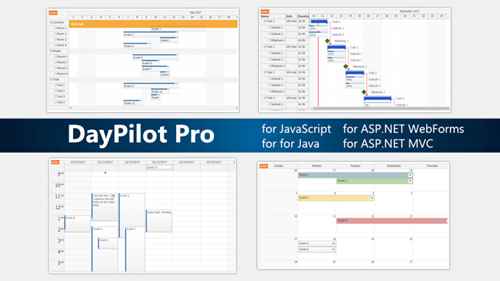
 Quien tenga conocimiento de mis artículos del Blog, recodará que tengo algunos artículos sobre el uso del Calendario y Gestor de Recursos de DayPilot. Es un producto muy utilizado en los desarrollos Web y dispone de características muy bonitas y prácticas. Desde mi punto de vista, lo considero con mejor UI y características que FullCalendar.
Aunque dispone de una versión Open Source, esta versión es muy, muy reducida y no la he tenido en cuenta para esta integración, ya que si necesitamos esta solución en un proyecto, creo que se puede pagar una licencia del mismo, dada la calidad que va a dar al proyecto.
Objetivo
En la web del fabricante no se indica que se puede utilizar con Svelte, pero veremos en el ejemplo que podemos utilizar la web Web JavaScript, para los desarrollos de Svelte.
Como objetivo, el ejemplo debe incorporar:
- Funcionamiento en Svelte 5 y utilización en código reactivo.
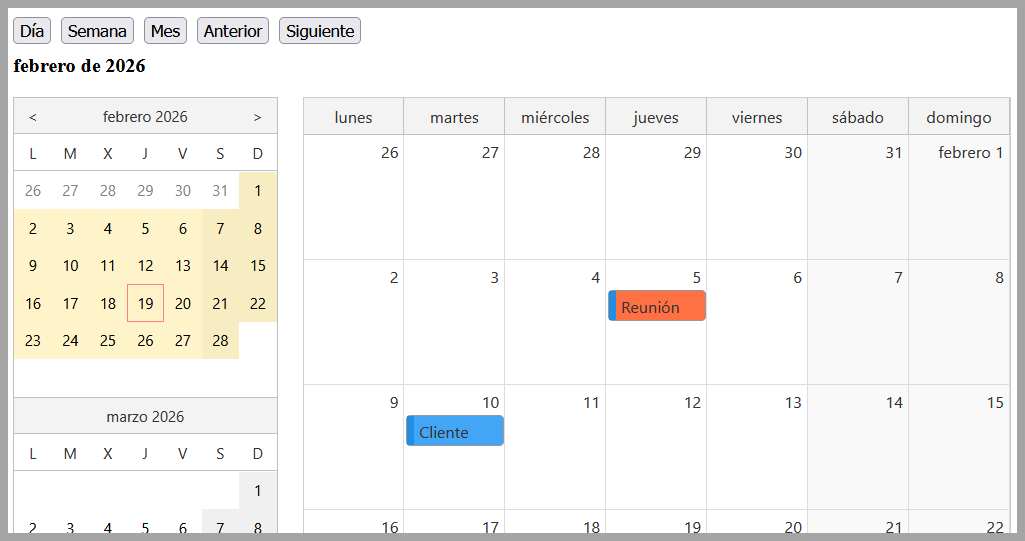
- Definición de calendario de día, semana y mes, disponiendo de una guía de 3 meses para poder navegar entre fechas.
- Etiquetado y coloreado de actividades.
- Operación de navegación para reposición de los datos (ahora son fijo, pero se dispone del ejemplo para hacer la petición de las acciones entre fechas).
- Evento de clic en una actividad o obtención de los datos de la acción. (para operaciones CRUD de actividad).
- Se ha personalizado para español, así se facilita la adaptación a otros idiomas.
DEMO: https://fhumanes.com/daypilot-svelte/
Solución Técnica
La integración se ha hecho con el método CDN, es decir, con la librería de JavaScript, cargando esta desde una URL (en este caso la librería la he puesto local, pero podría «tirar» del CDN donde publica el fabricante.
Paso a facilitar los fichero principales, para resaltar sobre ellos los aspectos más reseñables.
<!doctype html>
<html lang="en">
  <head>
    <meta charset="UTF-8" />
    <link rel="icon" type="image/svg+xml" href="/vite.svg" />
    <meta name="viewport" content="width=device-width, initial-scale=1.0" />
    <title>daypilot-svelte</title>
    <script src="./daypilot/daypilot-all.min.js"></script>
  </head>
  <body>
    <div id="app"></div>
    <script type="module" src="/src/main.js"></script>
  </body>
</html>
import { mount } from 'svelte'
import './app.css'
import App from './App.svelte'

// Configura la licencia de DayPilot
const DP = window.DayPilot;
DP.License = "TU_CLAVE_DE_LICENCIA";

const app = mount(App, {
  target: document.getElementById('app'),
})

export default app
<svelte:head>
  <!-- Se carga en página index.html porque cuando se recarga la página, se ejecuta el script ante de la carga de esta librería -->
  <!-- <script src="./daypilot/daypilot-all.min.js"></script> -->
</svelte:head>

<script>
  import { onMount } from "svelte";

  let dp;
  let scheduler;
  let nav;
  let currentView = $state("month");
  let visibleRange = $state("");

  let events = [
    {
      id: 1,
      text: "Reunión",
      start: "2026-02-05T10:00:00",
      end: "2026-02-05T11:00:00",
      backColor: "#FF7043"
    },
    {
      id: 2,
      text: "Cliente",
      start: "2026-02-10T12:00:00",
      end: "2026-02-10T13:00:00",
      backColor: "#42A5F5"
    }
  ];

  let resources = [
    { name: "Recurso A", id: "A" },
    { name: "Recurso B", id: "B" }
  ];

  let resourceEvents = [
    {
      id: "r1",
      text: "Tarea A",
      start: "2026-02-05T09:00:00",
      end: "2026-02-05T12:00:00",
      resource: "A",
      backColor: "#8BC34A"
    },
    {
      id: "r2",
      text: "Tarea B",
      start: "2026-02-06T10:00:00",
      end: "2026-02-06T14:00:00",
      resource: "B",
      backColor: "#FF9800"
    }
  ];

  function emitDateRange() {
    if (!dp) return;

    const start = dp.startDate;
    let end;

    if (currentView === "day") end = start.addDays(1);
    if (currentView === "week") end = start.addDays(7);
    if (currentView === "month") end = start.addMonths(1);

    console.log("Consulta al servidor:", {
      start: start.toString(),
      end: end.toString()
    });
  }

    function updateVisibleRange() {
    if (!dp) return;

    const start = dp.startDate.toDate(); // convertir a Date nativo

    const opcionesDia = { weekday: "long", day: "numeric", month: "long", year: "numeric" };
    const opcionesMes = { month: "long", year: "numeric" };
    const opcionesCorto = { day: "numeric", month: "short", year: "numeric" };

    if (currentView === "day") {
        visibleRange = start.toLocaleDateString("es-ES", opcionesDia);
    }

    if (currentView === "week") {
        const end = dp.startDate.addDays(6).toDate();
        visibleRange =
        `${start.toLocaleDateString("es-ES", opcionesCorto)} – ` +
        `${end.toLocaleDateString("es-ES", opcionesCorto)}`;
    }

    if (currentView === "month") {
        visibleRange = start.toLocaleDateString("es-ES", opcionesMes);
    }
    }

  function createCalendar() {
    const DP = window.DayPilot;
    if (dp) dp.dispose();

    const bubble = new DP.Bubble({
    onLoad: args =>
        {
            const e = args.source; // evento DayPilot
            const data = e.data;

            args.html = `
            <div style="padding:6px">
                <b>${data.text}</b><br>
                Inicio: ${data.start.toString("dd/MM/yyyy HH:mm")}<br>
                Fin: ${data.end.toString("dd/MM/yyyy HH:mm")}
            </div>
            `;
        }
    });

    const common = {
      locale: "es-es",
      startDate: "2026-02-01",
      events,
      onEventClick: args => alert(`Evento (calendario): ${args.e.data.text}`)
    };

    if (currentView === "day" || currentView === "week") {
    dp = new DP.Calendar("calendar", {
        ...common,
        viewType: currentView === "day" ? "Day" : "Week",
        eventHoverHandling: "Bubble",
        bubble
    });
    }

    if (currentView === "month") {
    dp = new DP.Month("calendar", {
        ...common,
        eventHoverHandling: "Bubble",
        bubble
    });
    }

    dp.init();
    updateVisibleRange();
    emitDateRange();
  }

  function createScheduler() {
    const DP = window.DayPilot;
    if (scheduler) scheduler.dispose();

    const bubble = new DP.Bubble({
        onLoad: args => {
            const e = args.source;
            const data = e.data;

            args.html = `
            <div style="padding:6px">
                <b>${data.text}</b><br>
                Recurso: ${data.resource}<br>
                Inicio: ${data.start.toString("dd/MM/yyyy HH:mm")}<br>
                Fin: ${data.end.toString("dd/MM/yyyy HH:mm")}
            </div>
            `;
        }
        });

    scheduler = new DP.Scheduler("scheduler", {
      locale: "es-es",
      startDate: dp.startDate,
      days: currentView === "day" ? 1 : currentView === "week" ? 7 : 30,
      scale: "Day",
      timeHeaders: [
          { groupBy: "Month", format: "MMMM yyyy" },
          { groupBy: "Day", format: "d" }
      ],
      resources,
      events: resourceEvents,

      eventHoverHandling: "Bubble",   // ← activar modo tooltip
      bubble,                         // ← conectar el Bubble

      onEventClick: args => alert(`Evento (recursos): ${args.e.data.text}`)
  });


    scheduler.init();
  }

  function loadAll() {
    const DP = window.DayPilot;

    if (!DP.Locale.locales || !DP.Locale.locales["es-es"]) {
      DP.Locale.register("es-es", DP.Locale.es_es);
    }

    nav = new DP.Navigator("nav", {   // 👈 guardamos en la variable global
      showMonths: 3,
      selectMode: "month",
      locale: "es-es",
      onTimeRangeSelected: (args) => {
        dp.startDate = args.start;
        dp.update();
        updateVisibleRange();
        emitDateRange();
        syncScheduler();

        none_demo();
      }
    });
    nav.init();

    createCalendar();
    createScheduler();

    none_demo();
  }


  onMount(() => {
    requestAnimationFrame(loadAll);
  });

  function syncScheduler() {
    if (!scheduler || !dp) return;
    scheduler.startDate = dp.startDate;
    scheduler.days = currentView === "day" ? 1 : currentView === "week" ? 7 : 30;
    scheduler.update();
  }

  function next() {
    if (!dp) return;

    dp.startDate =
      currentView === "month"
        ? dp.startDate.addMonths(1)
        : dp.startDate.addDays(7);

    dp.update();
    updateVisibleRange();
    emitDateRange();
    syncScheduler();

    if (nav) {
      nav.select(dp.startDate);   // 👈 sincroniza el Navigator
    }

    none_demo();
  }

  function prev() {
    if (!dp) return;

    dp.startDate =
      currentView === "month"
        ? dp.startDate.addMonths(-1)
        : dp.startDate.addDays(-7);

    dp.update();
    updateVisibleRange();
    emitDateRange();
    syncScheduler();

    if (nav) {
      nav.select(dp.startDate);
    }

    none_demo();
  }


  function changeView(view) {
    currentView = view;
    createCalendar();
    syncScheduler();

    none_demo();
  }

  // Función para ocultar los eventos con fondo naranja (solo para demostración)
  function none_demo() {
    const divs = document.querySelectorAll('div[style*="background-color: rgb(255, 102, 0)"]');

    divs.forEach(div => {
      div.style.display = "none";
    });
  }

</script>

<div class="controls">
  <button onclick={() => changeView("day")}>Día</button>
  <button onclick={() => changeView("week")}>Semana</button>
  <button onclick={() => changeView("month")}>Mes</button>

  <button onclick={prev}>Anterior</button>
  <button onclick={next}>Siguiente</button>
</div>

<div class="range">{visibleRange}</div>

<div style="display:flex; gap:20px;">
  <div id="nav" style="width:220px;"></div>

  <div style="flex:1;">
    <div id="calendar" style="width:100%; height:600px; margin-bottom:40px; border:1px solid #ccc;"></div>
  </div>
</div>


<h3>Recursos</h3>
<div id="scheduler" style="width:100%; height:400px; border:1px solid #ccc;"></div>

<style>
  .controls {
    display: flex;
    gap: 0.5rem;
    margin-bottom: 0.5rem;
    flex-wrap: wrap;
  }

  .range {
    font-weight: bold;
    margin-bottom: 1rem;
  }
</style>
En el fichero «index.html» vemos que se carga la librería desde una URL, en este caso hace referencia a un fichero del proyecto.
En el fichero «main.js» vemos cómo se puede incluir la licencia de la librería.
En el fichero «Calendar.svelte» tenemos todo el ejemplo. Los aspectos reseñables son:
- Vemos que entre las etiquetas <svelte-head> se puede cargar ficheros. En este caso se intentó y no funcionó porque se ejecuta el código antes de que se haya cargado la librería. Como aspecto especial, no se puede cargar los ficheros de esta forma, si los mismo se van a utilizar en «onMount».
- Las actividades y recursos de demo son fijos, y están situados a fecbrero de 2026.
- Los botones de «anterior» y «siguiente», funcionan para semanas y meses. Es fácil resolverlo para diario. Te lo dejo como «reto».
- Vereis que el Calendario y Los Recursos se ajustan a las fechas que se fijen.
Espero que os guste y veaís que si no son todas, si una gran mayoría de las librerías de JavaScript se pueden utilizar en esta solución de Svelte 5.
Como siempre, os dejo los fuentes para que lo instaléis en vuestros PC’s y hagáis todas las pruebas que necesitéis.
Adjuntos
| Archivo | Tamaño de archivo | Descargas |
|---|---|---|
 daypilot-svelte
|
272 KB | 23 |